The design system
Two systems, one story — the iOS app and the framework story site share the same 13 UX foundations, ~125 semantic tokens, and CI-enforced compliance. The iOS app proves the system in production. This site is the public observable surface.
Why a design system:it's a product asset. It guarantees consistency, accessibility, and shipping speed — and the guarantees are CI-enforced, not aspirational. Below: what it promises and how drift is caught.
The 13 principles
- 1.Clarity over cleverness
- 2.Touch affordances above 44pt
- 3.One primary CTA per screen
- 4.Progressive disclosure by default
- 5.Motion communicates state change, not personality
- 6.Empty states teach, not decorate
- 7.Error recovery beats error prevention
- 8.Loading states beat spinners
- 9.Color is a last-resort differentiator
- 10.Every interactive element has a disabled variant
- 11.Accessibility is a constraint, not a feature
- 12.Typography owns hierarchy
- 13.Spacing owns grouping
Onboarding flow — six screens
The first-run path uses the same typography, spacing, card radius, and CTA logic as the rest of the app — so onboarding feels like the beginning of the product, not a separate mini-site. Every screen offers an explicit skip; no step blocks.
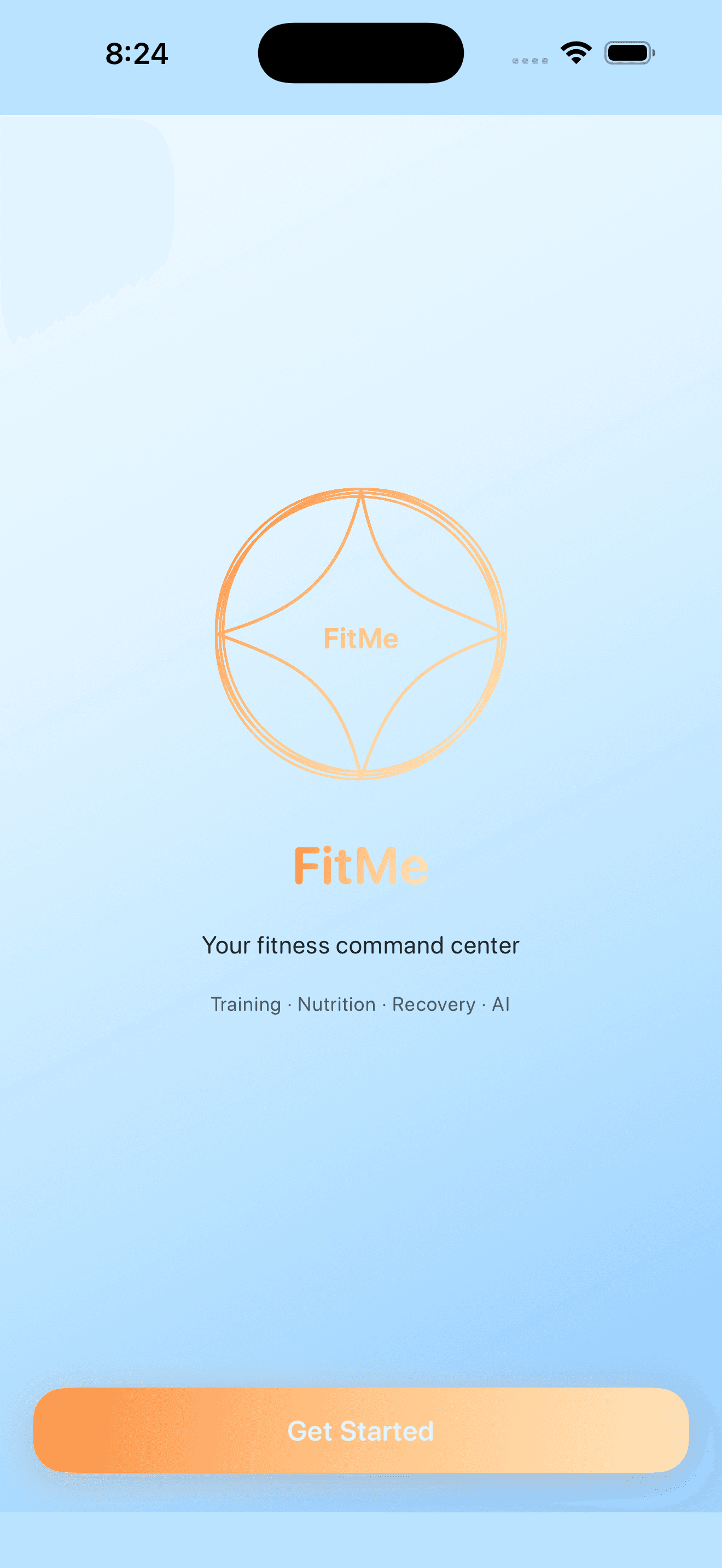
Brand entry. One CTA, no chrome, the wordmark and the value proposition. The first frame the user judges the app on.
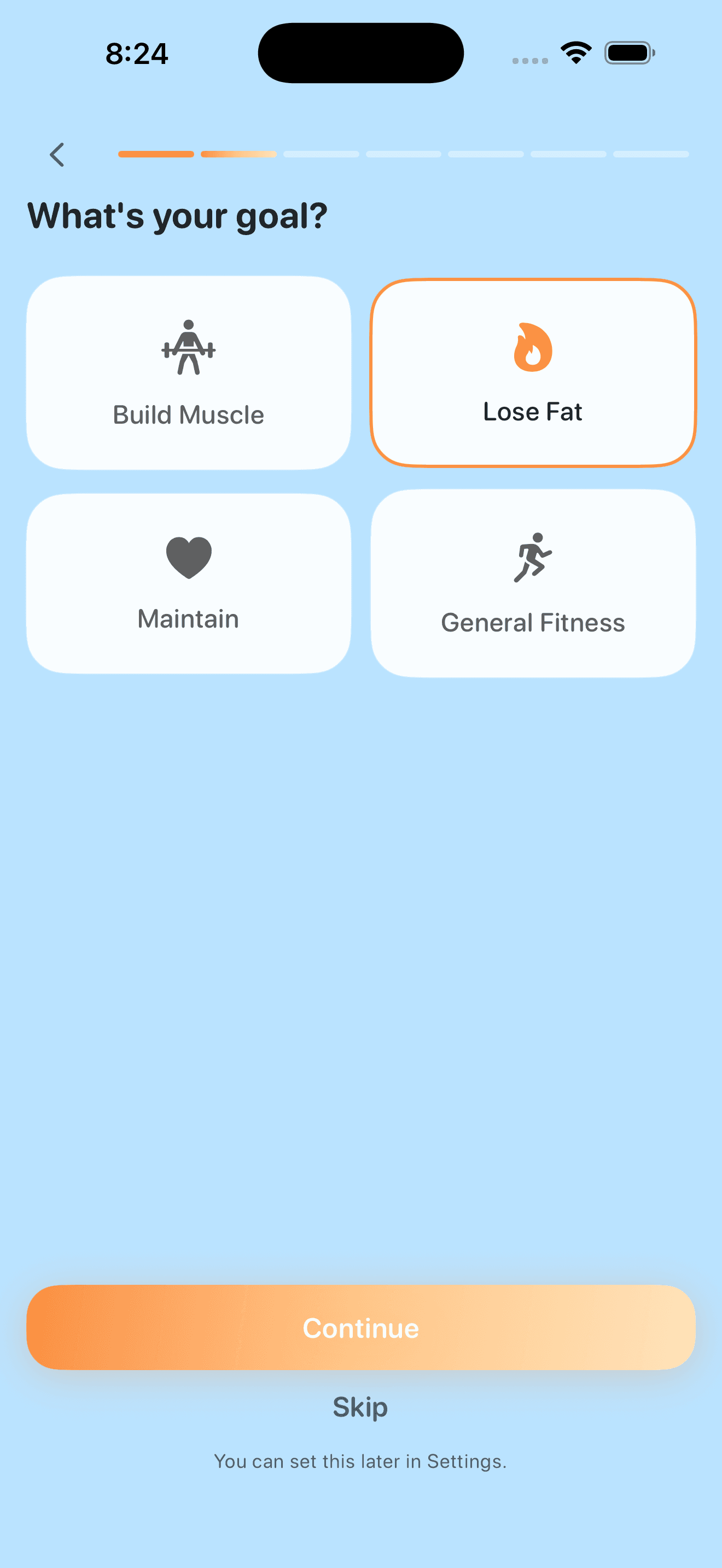
A concrete outcome chosen up front, with large touch targets and a single primary action. The progress bar at top is the only navigation chrome.
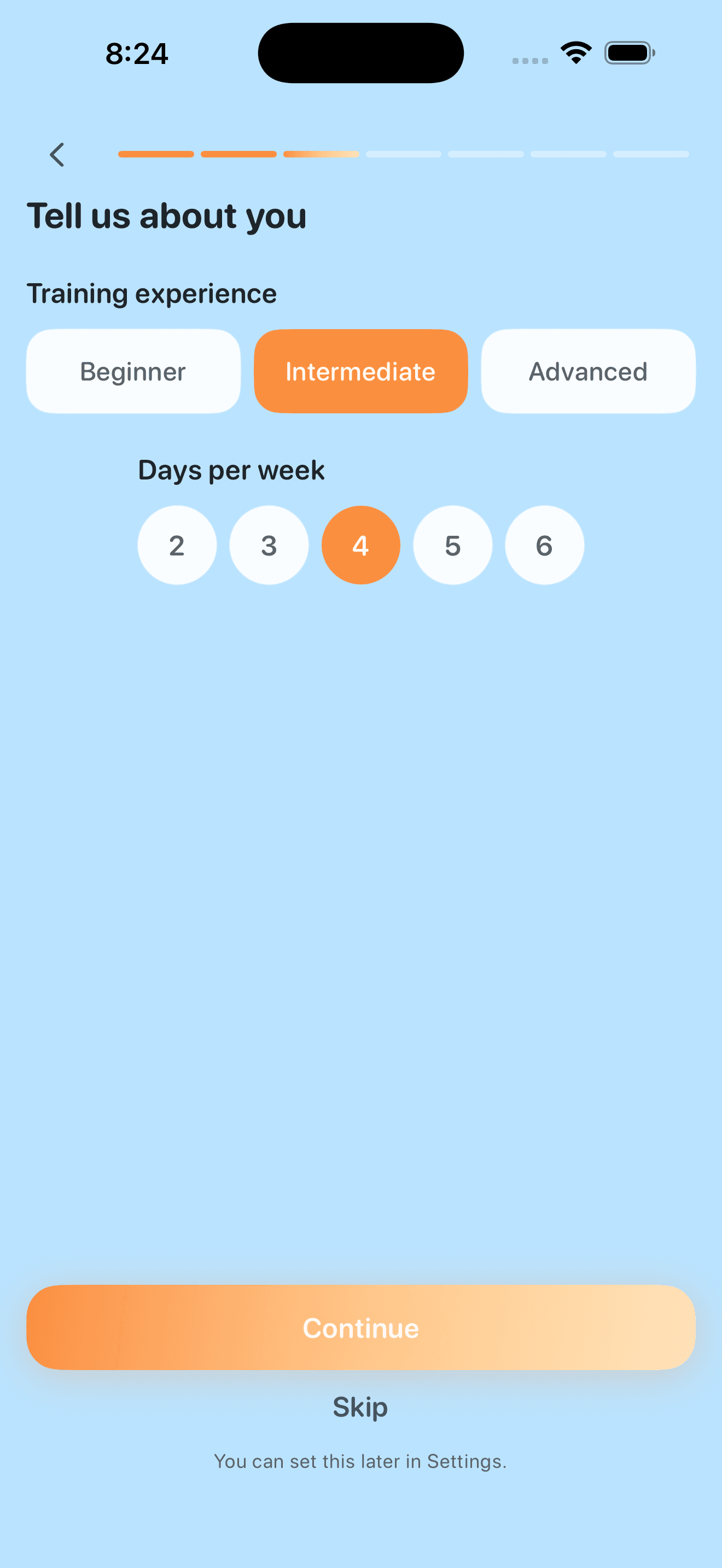
Training experience and weekly frequency calibrate the program. Skip is always available — onboarding never blocks.
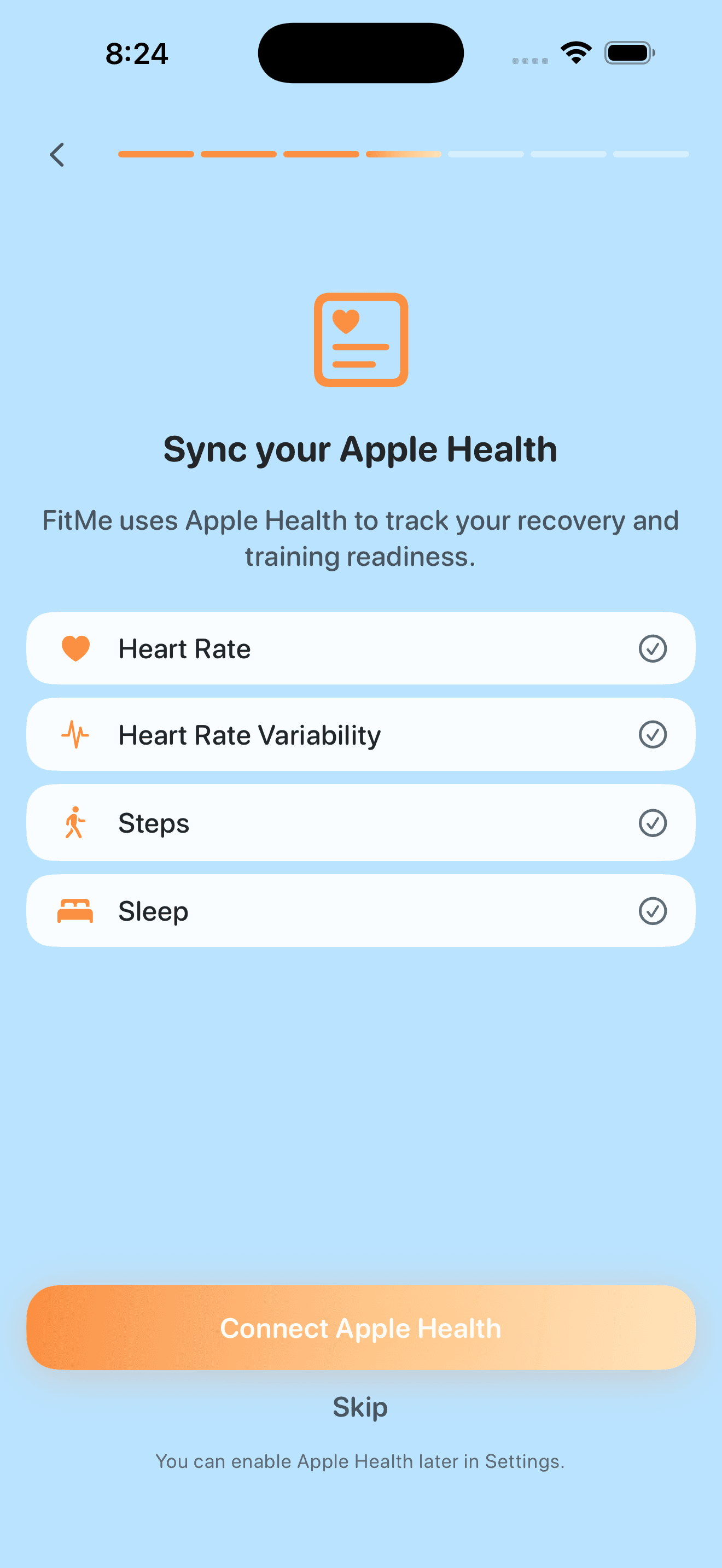
Permission with intent. Each data type listed by purpose, recovery and readiness explicitly named. Skip with a clear later-in-Settings escape.
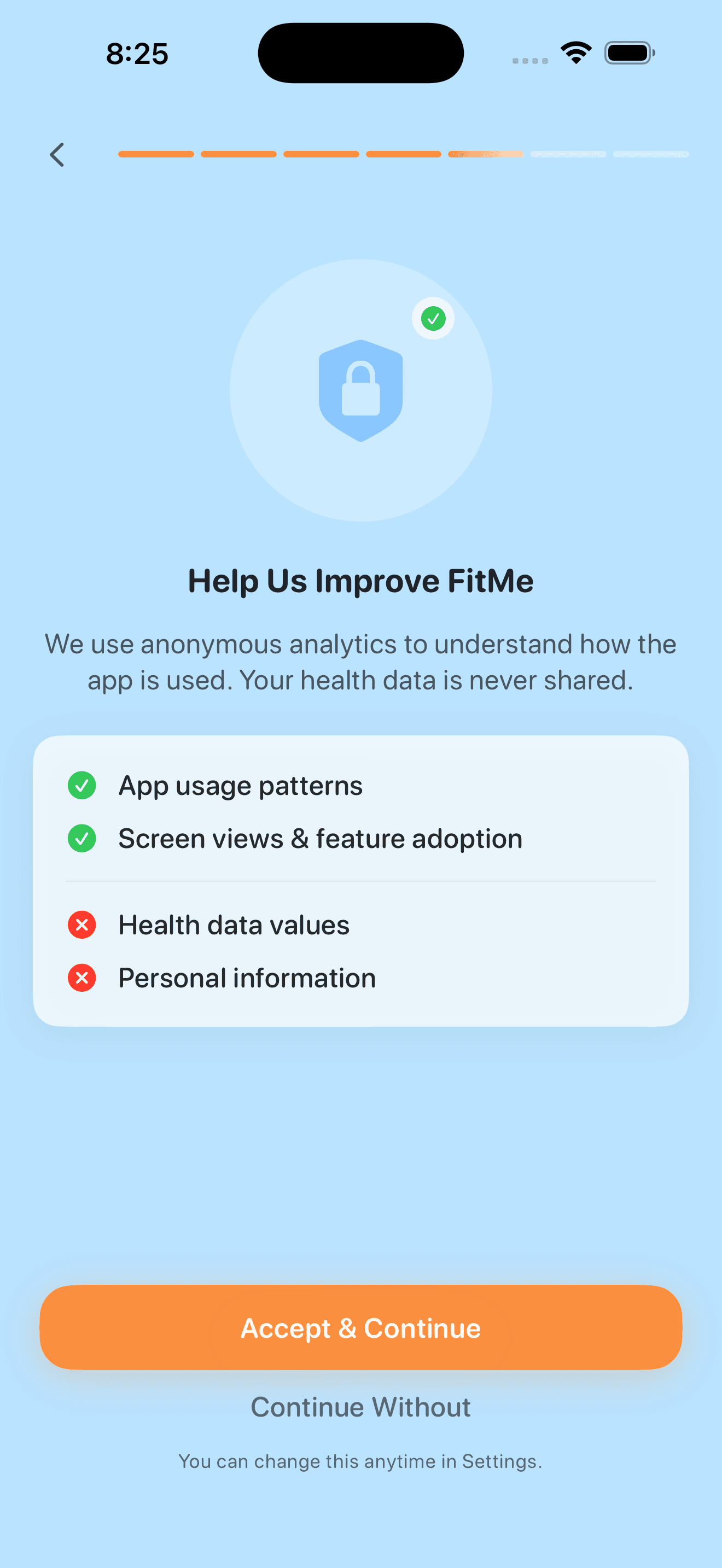
Honest analytics. Green checks on what is collected, red on what is not — health values and personal information stay local. Continue Without is just as prominent as Accept.
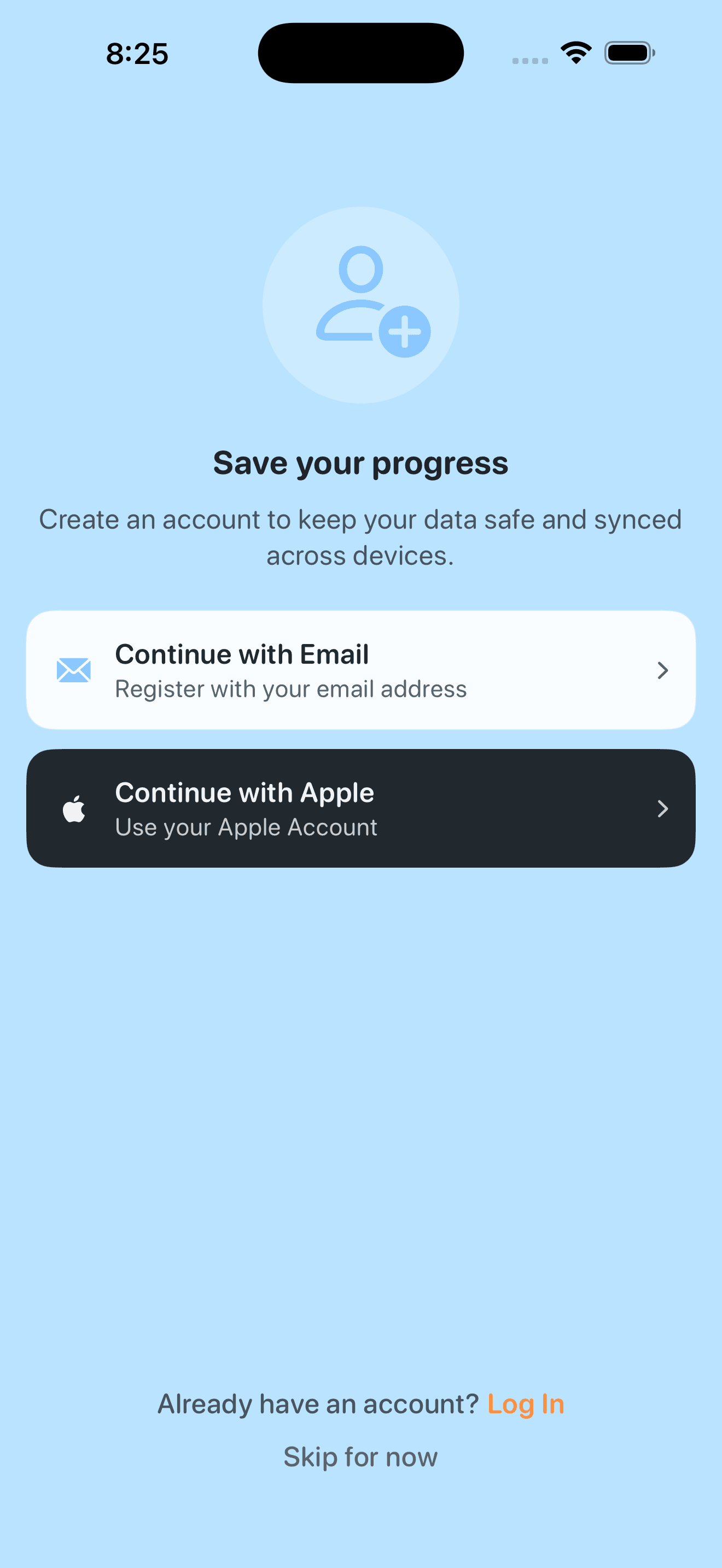
Email or Apple, both equally weighted, log-in for returning users, skip-for-now for trial. The ladder reads top-down by friction.
Live app — daily use with mock data
Four screens from the daily flow, captured against a seeded test profile so the data is realistic without exposing real users. Same tokens, same components, same metric-tile grammar carried from onboarding into Home, Training, Session-Complete, and Nutrition.
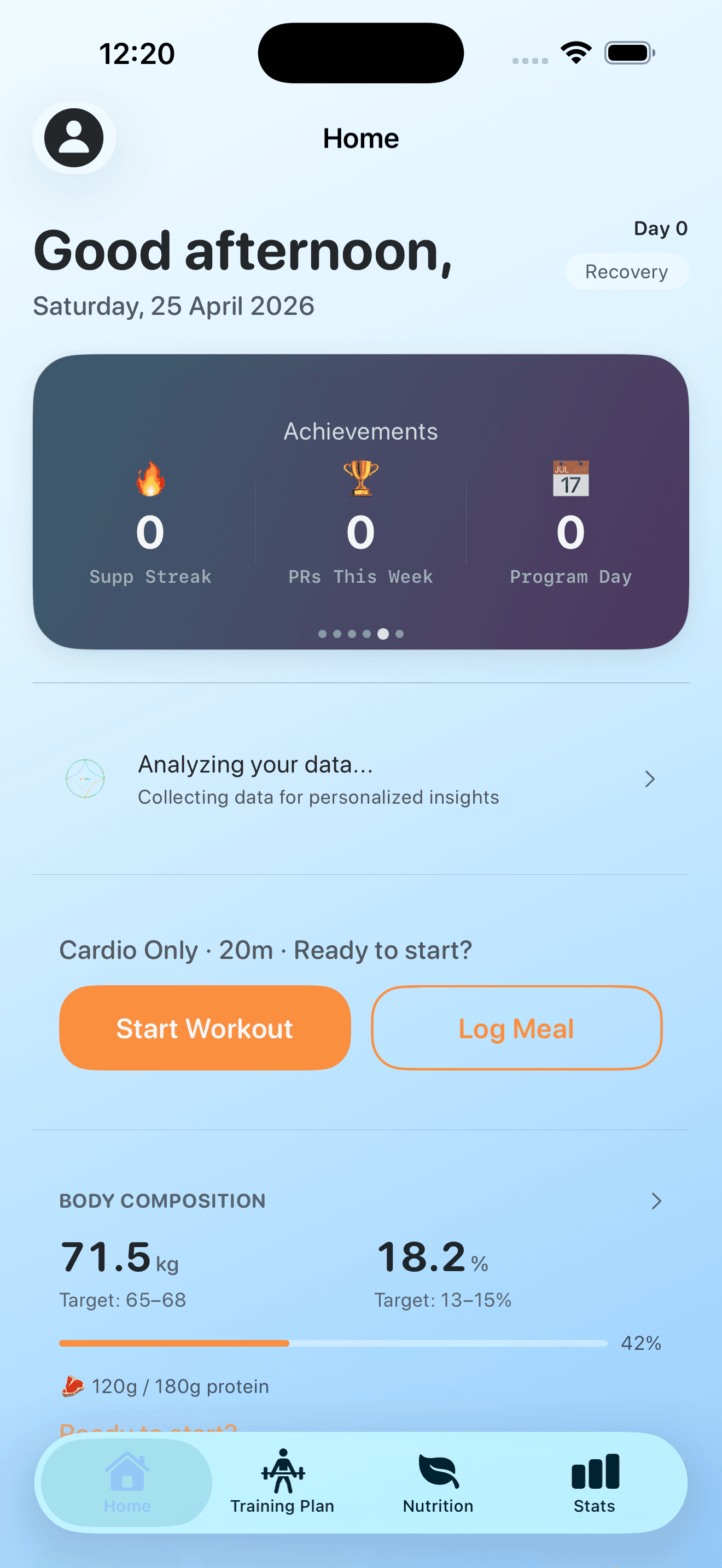
Personalized greeting, rotating achievements card, contextual day type (rest day with Start Recovery + Log Meal), body-composition snapshot below the fold. All actions are one tap away.
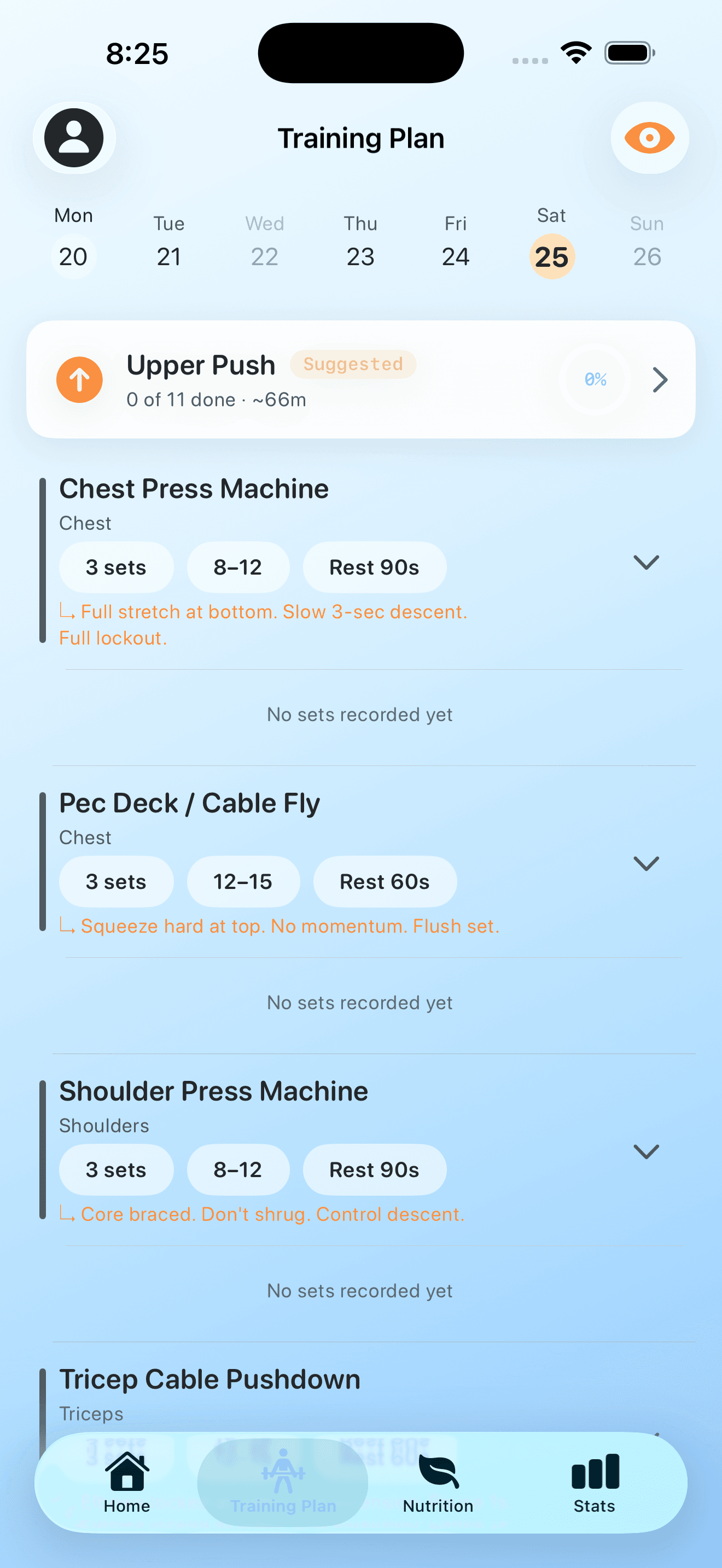
Week strip with completion dots, suggested session card with progress ring, exercise rows showing sets / rep range / rest plus an inline coaching note in the brand orange.
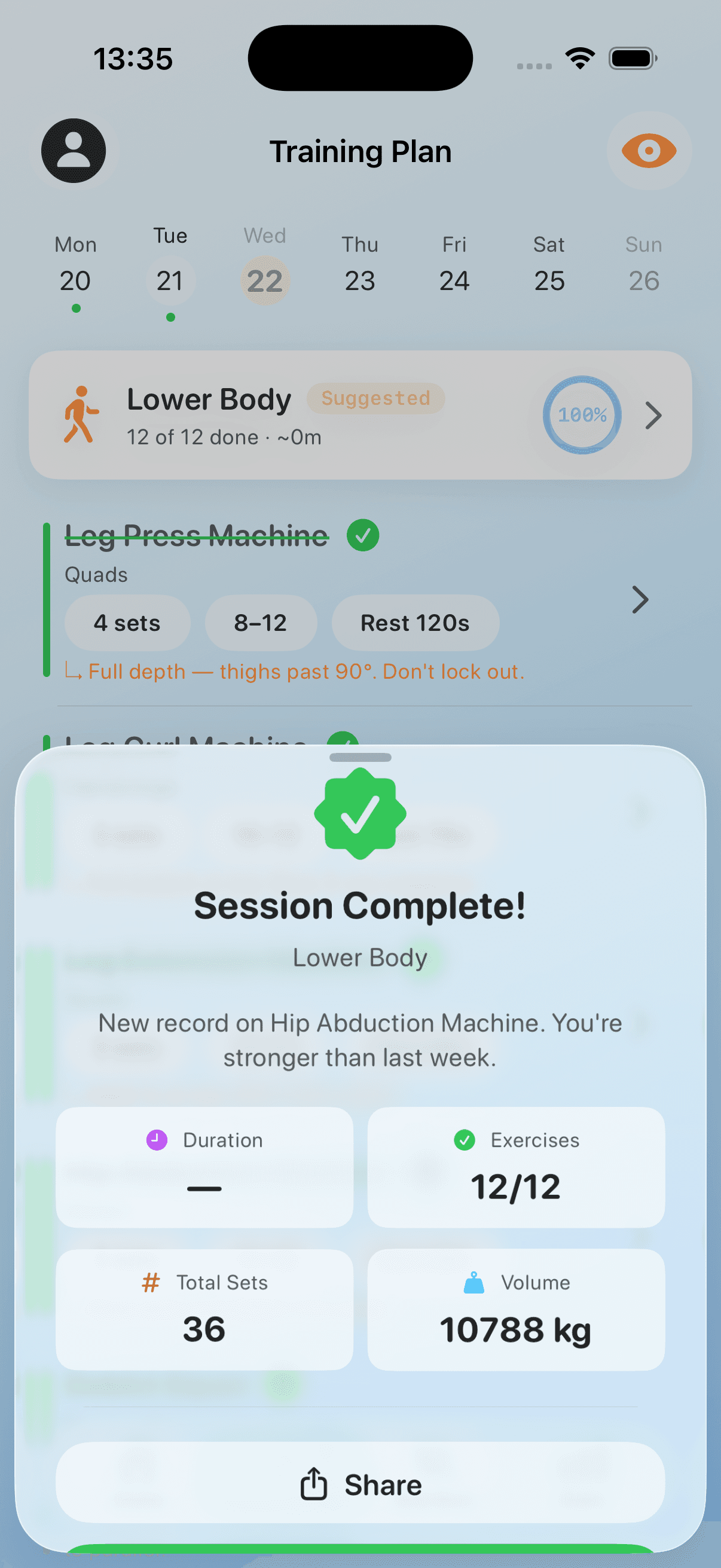
Modal presentation honours every PR. Duration, exercises, total sets, and volume rendered in the same metric-tile grammar as the home dashboard. Share is one tap.
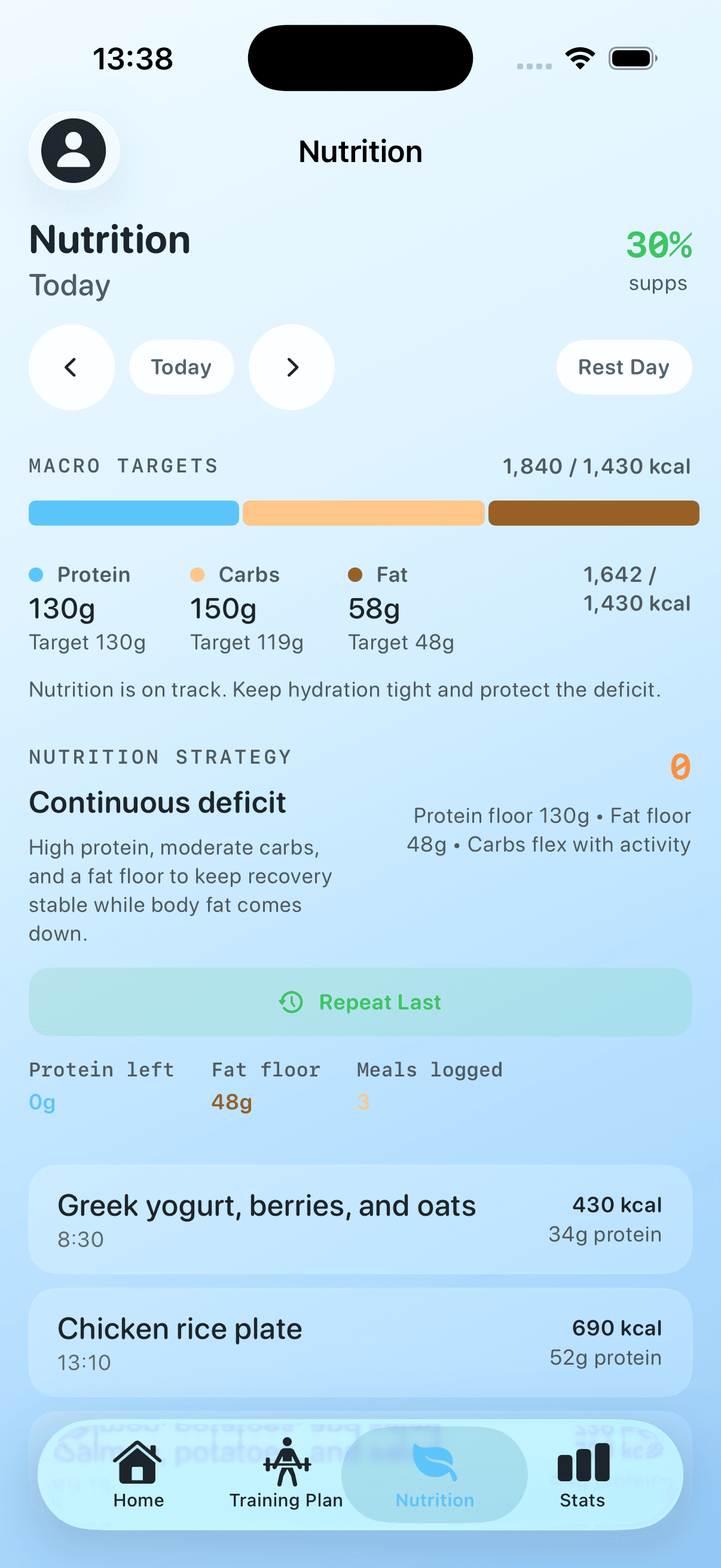
Macro targets at the top, named strategy beneath ("Continuous deficit"), Repeat Last for the daily ritual, meals timestamped with kcal + protein. Same chip and card grammar as the rest of the app.
Under the hood
What the principles and screens look like at the token layer — the raw inputs every view in the app composes from.
Part 2
The system that renders this site
Part 1 narrates the iOS app's system. Part 2 documents the system rendering this very page — the React components, Tailwind tokens, MDX callouts, and audit decisions that compose the framework story site itself. It exists so designers and contributors can see what's here, what's mapped to Figma, what's pending, and what we've already decided.
Parity at a glance
This snapshot is computed at build time from the typed component manifest at src/lib/design-system.ts. The drift detection script (Bucket D of this feature) cross-checks the manifest against the live Figma file on a weekly cron and on-demand via make figma-drift.
Tokens — motion, elevation, z-index
Color, type, and measure tokens are documented in the “Under the hood” disclosure above (shared with the iOS app). Motion, elevation, and z-index ladder — added in this feature's Bucket A — are below.
Motion
Material M3 vocabulary. All wrapped in @media (prefers-reduced-motion: reduce) for opt-out.
- Fast (duration)
--motion-duration-fast120msMicro-feedback — copy ✓, hover affordance. - Standard (duration)
--motion-duration-standard200msDefault for state changes — modal open, badge appearance. - Slow (duration)
--motion-duration-slow320msSignificant transitions — page-level transitions, large layout shifts. - Standard (easing)
--motion-easing-standardcubic-bezier(0.4, 0, 0.2, 1)Symmetric in/out — default for most transitions. - Decelerate (easing)
--motion-easing-deceleratecubic-bezier(0, 0, 0.2, 1)Element entering — slows as it lands. - Emphasized (easing)
--motion-easing-emphasizedcubic-bezier(0.2, 0, 0, 1)Hero moments — extra anticipation + landing.
Elevation
Each level shown rendered in light + dark. Dark-mode shadows bump opacity to compensate for low contrast against neutral-900.
- LightDarkLevel 1 · level 1
--elevation-1Resting cards, subtle separation from background.
- LightDarkLevel 2 · level 2
--elevation-2Hovered cards, dropdowns, popovers.
- LightDarkLevel 3 · level 3
--elevation-3Floating panels, sticky headers.
- LightDarkLevel 4 · level 4
--elevation-4Modals, drawers — highest elevation.
Z-index ladder
10× spacing leaves room for insertions. Header stays above hover; modal blocks everything; toast outranks modal so transient feedback is always visible.
- Base
--z-base0Default flow — most page content. - Elevated
--z-elevated10Hover state, dropdown trigger lift. - Header
--z-header100Sticky site header above content. - Modal
--z-modal1000Dialogs, drawers — fully blocking. - Toast
--z-toast10000Transient feedback — above everything.
Components
34components catalogued. Status badges indicate maturity (Stable, Experimental, Deprecated, Internal). Where Figma frames exist, each card links to the node; where they don't yet, the card flags it for Bucket C.
Primitives
7 components
Button
Stable3-variant CTA: primary / secondary / ghost. 44px min-touch target, focus ring.
Where used: Almost every page: nav, hero CTAs, MDX callouts, control-room actions.
Tag
StableCompact 3-variant label: flagship / standard / tier_t1.
Where used: Case-study cards, hero status badges, framework-version metadata.
CaseStudyCard
StableHero card linking to a case study: title + tldr + tag + href.
Where used: Homepage feed, /case-studies index, related-work blocks.
FrameworkVersionCard
StableCard for a framework version: version + date + outcome + href.
Where used: Framework timeline, /pm-flow page, related-version blocks.
Card
StableGeneric bordered container — flat or tinted variant, optional interactive hover.
Where used: Public routes (about, pm-flow, framework, research) — anywhere a bordered content block needs consistent styling. Replaces ~10 inline rounded-md/lg border patterns identified in DS lens audit BHF-1.
Callout
StableSemantic callout for non-MDX surfaces — info / warn / success / danger variants with left-border accent + icon + optional eyebrow title.
Where used: /trust audit-results aside, /research note asides, info boxes outside case-study MDX. Distinct from src/components/mdx/callouts/* which are pre-baked semantic callouts (HonestDisclosure, TriggerIncident, etc.) with fixed variants.
Stat
StableMetric-display primitive — value (big number) + label + optional sublabel. 3 sizes (sm/md/lg), optional brand-indigo accent, optional serif typeface.
Where used: NumbersPanel (homepage), OriginNarrative (homepage), timeline keyMetric, ParitySummaryCard (design-system showcase). Replaces inline text-{3,4,5}xl font-semibold patterns identified in DS lens audit BHF-4.
Layout
4 components
SiteHeader
StableTop nav with theme toggle, search, primary route links.
Where used: All pages (rendered in app/layout.tsx).
SiteFooter
StableFooter with copyright + secondary links.
Where used: All pages.
MobileNav
StableHamburger menu for narrow viewports — primary nav links + theme toggle.
Where used: Site-wide, rendered inside SiteHeader at < 768px.
SearchInput
StableSearch input with command-palette behavior (Cmd+K).
Where used: SiteHeader (desktop) and /search route.
MDX callouts
5 components
HonestDisclosure
StableCallout for honest disclosure of failures, limits, or contradictions.
Where used: Case studies + meta-analyses (MDX).
TriggerIncident
StableSurfaces the incident or audit finding that triggered a feature.
Where used: Framework-version case studies (MDX).
MemoryRef
StableReference to a memory entry — links the narrative to durable context.
Where used: Case studies (MDX).
PredecessorChain
StableShows the dependency chain — what feature unblocked this one.
Where used: Feature case studies (MDX).
KillCriterionResolution
StableResolution of a kill criterion declared in PRD — what happened, what we learned.
Where used: Case studies (MDX).
UI utilities
1 component
Disclosure
StableAccessible expand/collapse with custom chevron and Safari quirks fixed.
Where used: /design-system Part 1 sections, FAQ-style content blocks.
Persona
3 components
PersonaBar
StableTop strip showing the active reading persona + switcher.
Where used: Site-wide (when persona selected).
PersonaIndicator
StableInline indicator that content has been emphasized for the current persona.
Where used: Inline within case-study / framework MDX content.
PersonaLens
StableVisual treatment applied to content blocks under a persona context.
Where used: MDX content wrappers.
Control-room (Internal)
10 components
FeatureCard
InternalCard for a feature in the control-room dashboard with status + phase.
Where used: /control-room/features list view.
TaskCard
InternalSingle task display for the operator backlog view.
Where used: /control-room/tasks list view.
TaskTree
InternalNested task hierarchy view for feature breakdowns.
Where used: /control-room/features detail view.
AlertsBanner
InternalTop-of-page alert strip for active framework status / overdue features.
Where used: /control-room/* pages.
AuditEventRow
InternalOne row of the integrity-cycle audit log.
Where used: /control-room/audit log view.
AuditLogPanel
InternalContainer for a paginated audit-event list with filtering.
Where used: /control-room/audit dashboard.
AuthPasskeyForm
StableWebAuthn passkey registration / sign-in form for /control-room/sign-in.
Where used: /control-room/sign-in only.
DevicesTable
InternalList of registered passkey devices for the signed-in operator.
Where used: /control-room/account.
TrackedDocLink
InternalLink to a doc with click-tracking instrumentation for ops analytics.
Where used: /control-room/* docs surfaces.
ThemeToggle
InternalLight / Dark / System theme switcher button.
Where used: SiteHeader + control-room dashboard.
Bespoke (Internal)
4 components
BlueprintOverlay
InternalArchitecture-blueprint overlay used in framework explanation pages.
Where used: /framework + selected case studies.
ChipAffinityMap
InternalHardware-chip affinity visualization for HADF case studies.
Where used: HADF case studies + research notes.
DispatchReplay
InternalLive-demo of dispatch decisions on real traces.
Where used: Framework demo page.
PhaseTimingChart
InternalTiming chart showing phase durations across features.
Where used: Meta-analysis case studies.
Drift report
Last run: never (Bucket D ships in this feature).
Once Bucket D lands: weekly cron + on-demand make figma-drift / npm run figma-drift will append a dated report to docs/design-system/figma-code-sync-status.md and surface here.
Dark-mode parity
Per-component status surfaced inline on each component card above (◐ Designed, ◑ AutoDerived, ✗ TODO, — NotApplicable).
Full matrix doc with contrast ratios + last-audited dates ships in Bucket E: docs/design-system/fitme-story-dark-mode-coverage.md.
Design heritage
Durable design decisions made on this site before the design-system feature shipped. Audit findings (P0/P1/P2) and locked patterns whose rationale matters when contributors ask “why is it this way?”.
Audit decisions
A-001P0Skip-to-content linkProblem: Keyboard users had no way to bypass the site nav on every page navigation.
Fix: Site-wide "Skip to main content" link rendered as the first focusable element on every route.
Resolved 2026-05-08· fitme-story #59· Affects: SiteHeader, app/layout.tsxA-002P0Light-mode body text contrastProblem: --color-neutral-500 was #78716C, computing 4.16:1 contrast on neutral-50 — a P0 WCAG AA fail for body text.
Fix: Shifted to #5C5754, which computes 4.83:1 on neutral-50.
Resolved 2026-05-08· FT2 #254· Affects: --color-neutral-500A-018P0Dark-mode body text contrastProblem: After A-002 fix, dark-mode --color-neutral-500 still failed on the new background.
Fix: Confirmed dark-mode override at #A8A29E passes WCAG AA on neutral-900 background.
Resolved 2026-05-08· FT2 #254· Affects: --color-neutral-500 (dark)V-004P0Mobile hamburger navProblem: No mobile nav; nav links were hidden on viewports < 768px with no replacement affordance.
Fix: Built `<MobileNav>` with full primary-link list + theme toggle + close-on-route-change.
Resolved 2026-05-08· fitme-story #59· Affects: MobileNav, SiteHeaderA-014P1Image alt-text is content-describing, not a titleProblem: `<Image alt={shot.title} />` repeated the visible figcaption — useless to screen readers.
Fix: Wrote unique content-describing alt text for every onboarding + live-app screenshot. Title and caption stay in the figcaption; alt describes the image itself.
Resolved 2026-05-08· fitme-story #61· Affects: /design-system/page.tsx (Part 1 onboarding + live-app screens)CS-006P1Editorial table mobile overflowProblem: Wide tables in case-study prose overflowed the viewport at < 640px with no scroll affordance.
Fix: Added `display: block` + `overflow-x: auto` + `-webkit-overflow-scrolling: touch` to `.prose table`.
Resolved 2026-05-08· fitme-story #61· Affects: .prose table CSSCS-008P1Frontmatter chrome bimodalProblem: Some case studies had rich frontmatter chrome (SummaryCard, DataKey, callouts), others showed just the markdown — bimodal experience.
Fix: Locked Alternative A chrome 2026-04-28: SummaryCard → DataKey → VisualAidResolver → KillCriterionBanner → DeferredItemsList → narrative body. Backfilled 25/25 case studies.
Resolved 2026-04-28· fitme-story #8, FT2 #146· Affects: case-study layout, frontmatter auditCS-020P1Wide table overflow at narrow viewportsProblem: Same root cause as CS-006 but in a different MDX context.
Fix: Resolved by the same `.prose table` CSS update.
Resolved 2026-05-08· fitme-story #61· Affects: .prose table CSSCS-016P2TimelineNav unusedProblem: Component shipped but no route imported it — dead code.
Fix: Removed TimelineNav. Replaced with ArticleNav (sticky TOC + scroll progress + prev/next) which IS used.
Resolved 2026-05-08· fitme-story #59· Affects: ArticleNav (replacement)R-009P2Table cell readabilityProblem: Default Tailwind typography table styling was too tight + lacked clear header band.
Fix: Editorial overrides: tighter cell padding, warmer borders (neutral-200/300), header band with 0.04em letter-spacing.
Resolved 2026-05-08· fitme-story #61· Affects: .prose table CSST24P2Inline code overflow at narrow viewportsProblem: Long file paths or commit SHAs in inline `<code>` blew out the 360px viewport.
Fix: `overflow-wrap: anywhere` + `word-break: break-word` on `.prose code`.
Resolved 2026-05-09· fitme-story #75 (T24)· Affects: .prose code CSS
Locked patterns
- Case-study presentation: Alternative A chromelocked 2026-04-28
Story-first composition (2026-06-21): header (badge · h1 · tldr lead) → visual-aid band + compact TierLegend → narrative body → HonestDisclosures · KillCriterionBanner · DeferredItemsList epilogue. One config-driven template (CaseStudyArticle) renders every tier. Frontmatter audit gates the chrome.
Rationale: Picked over Alternative B (lighter, less structured chrome) because cross-case-study comparison + skim-readability was a primary user goal. 25/25 case studies backfilled to validate.
Applies to: /case-studies/[slug], all MDX in content/04-case-studies/ - Frontmatter audit gatelocked 2026-04-28
Build-time validator (`fitme-story/scripts/validate-frontmatter.ts`) gates every MDX for presence of: tldr, key_numbers, visual_aid, honest_disclosures, kill_criteria, related_features, primary_metric, framework_version. PR fails CI if any required field missing.
Rationale: Avoids silent regressions where new case studies skip the chrome and revert to bare markdown.
Applies to: all content/04-case-studies/*.mdx - /glossary route page-structure patternlocked 2026-04-15
Editorial single-page route: hero → category headers → entry list. Sourced from a typed manifest (`src/lib/glossary.ts`).
Rationale: Type-safe, server-rendered, easily searchable. Generalizes to other typed-manifest routes (the new `/design-system` route follows this).
Applies to: /glossary, /design-system (this feature) - CSS variable naming: --{category}-{property}-{variant}locked 2026-04-12
`--color-brand-indigo`, `--text-display-xl`, `--measure-body`, `--motion-duration-fast`. Category prefix narrows the search space; variant suffix is the value qualifier.
Rationale: Predictable + grep-friendly + matches Tailwind v4 @theme convention.
Applies to: all design tokens - Reduced motion: blanket opt-outlocked 2026-04-15
`@media (prefers-reduced-motion: reduce) { *, *::before, *::after { animation-duration: 0.001ms !important; ... transition-duration: 0.001ms !important; ... } }`
Rationale: One global override is more robust than per-component opt-outs (which contributors would forget to add). Catches reduced-motion users by default.
Applies to: all routes - Persona emphasis: soft overlay, not branching contentlocked 2026-04-20
PersonaIndicator + PersonaLens render as INLINE markers within unified content — they do not branch the prose tree. Same MDX is read by every persona; the lens just highlights different bits.
Rationale: Avoids content drift across personas. Single source of truth, multiple reading orientations.
Applies to: MDX content, PersonaIndicator, PersonaLens - Safari tap-highlight removallocked 2026-04-28
`-webkit-tap-highlight-color: transparent` on `details > summary`, `button`, `a`, `[role="button"]`. Custom focus ring (Tailwind focus-visible) is the canonical interactive feedback.
Rationale: iOS Safari blue highlight conflicted with our editorial color palette. Custom focus ring is more on-brand.
Applies to: all interactive elements
How to contribute
Three rules for every new component on this site:
- 1.Reuse before adding. Check this catalog first. Most patterns already exist as tokens or primitives — extend before creating.
- 2.Add a manifest entry. Append to
src/lib/design-system.ts. The drift detection script will surface mismatches; the showcase will render automatically. - 3.Map to Figma when possible. Author a
.figma.tsxfile alongside the component; capture the Figma node ID in the manifest. Note: Code Connect publishing is disabled (requires a Figma Org/Enterprise plan) — the mapping documents intent only, and re-activates if the plan is upgraded.
Full contribution doc lives at docs/CONTRIBUTING-design-system.md (Bucket F of this feature).